
 Backed by Y Combinator
How to Start an Online Tutoring Business
The practical guide — and the platform thousands of tutors use when they're ready to grow. Pick your niche, set your rate, find your first students, and choose a classroom built for teaching. You can start your first lesson today, free.
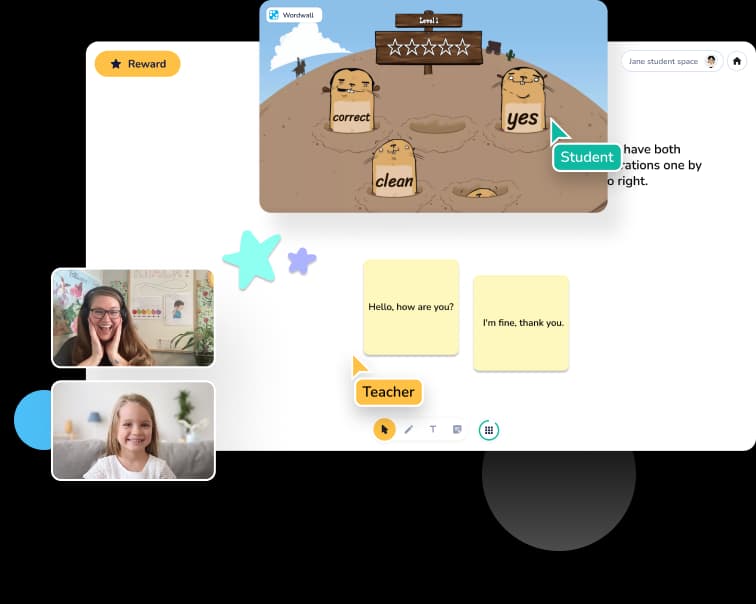
Before you start — three things worth knowing
The tutors who build stable online practices tend to get a handful of decisions right early. Here are the ones that matter most. Already shopping for a teaching platform beyond Zoom? Our side-by-side of the best Zoom alternatives for online tutoring puts Koala Go next to Lessonspace, LearnCube, Vedamo, Whereby, and Google Meet.
Pick something you're good at, and something parents will pay for
The best online tutoring businesses sit at the intersection of your strongest skill and real parent demand. Reading, math, ESL, music, test prep, and learning-difference support (dyslexia, dyscalculia, ADHD) all have strong demand. Niche beats general — "Orton-Gillingham reading specialist" converts far better than "general tutor."
You don't need a classroom, a certification program, or a business degree
What you need: a laptop, a headset, a reliable internet connection, a quiet space, and a platform that was built for teaching. Legal structure (sole proprietor vs LLC) can come later. Start with the teaching; formalize when you have paying students.
Your platform choice matters more than tutors realize
A generic video tool like Zoom can get you through your first few lessons, but it will hold you back — especially with young students. Tutors who scale past a handful of students almost always switch to a purpose-built classroom with a whiteboard, interactive browsing, and engagement features kids actually respond to.
The 5 steps to starting your online tutoring business
A practical walk-through. None of this requires a business degree. Most of it you can do in an afternoon. Already evaluating a familiar Google tool like Google Classroom for the teaching itself? Our Q&A on Google Classroom for private tutoring is worth reading before you commit.
Decide your niche and target student
Pick a subject you can teach confidently and an age range you like working with. "Reading support for elementary-age students" is a tight niche with high demand. "Homework help" is generic and hard to stand out in. Write down, in one sentence, who you help and what you help them with.
Set your hourly rate
New online tutors typically charge $25–$45/hr in the US and UK, higher for specialized instruction (reading interventionists and test-prep tutors regularly charge $60–$120/hr). Don't price yourself too low out of nerves — parents often read cheap rates as a negative quality signal. Start at the top of what feels defensible, adjust based on demand.
Choose your teaching platform
This is the decision most new tutors get wrong. Zoom and Google Meet are fine for a single trial lesson, but they're not designed for teaching — there's no real whiteboard, no way to engage younger students, and screen share is painful on the iPads and tablets most kids use. Pick a platform built for tutors. Koala Go is free to start and used by thousands of teachers worldwide. For a side-by-side of how Koala Go, Lessonspace, and LearnCube compare on whiteboard, shared browsing, and group size, see our guide to choosing an interactive online teaching platform.
Find your first students
The fastest first-student channels: (1) your personal network — post on Facebook, Instagram, or your local parent groups; (2) referral partners — reach out to schools, special-ed coordinators, and existing tutors in adjacent niches; (3) marketplaces like Wyzant, Preply, or Varsity Tutors to build experience quickly, even if the rates are lower than direct. The goal for month 1 is 3–5 regular students, not 30.
Invoice, schedule, and grow
Once you have a few students, the admin becomes real. Weekly scheduling, lesson recordings for parents, invoicing in whatever currency the family uses — these quickly turn into hours of unpaid work if you're juggling separate tools. A single platform that includes scheduling and worldwide invoicing (Koala Go does) saves hours per week. That's hours you can spend teaching or with your own family.
How much does it cost to start an online tutoring business?
Roughly $60–$120 in cash if you already own a laptop with a working camera, and often net-positive in the first paying month — because a single regular student at $30 an hour more than covers the tools. The cost breaks into three buckets.
Upfront hardware you probably already have
A working laptop with a camera is the biggest line item, and most tutors already own one. Add a USB headset with mic ($30–$50 — the single audio upgrade parents notice most), a simple ring light or a bright window at eye level ($20–$50), and a $10–$15 Ethernet cable that removes an entire category of "sorry, Wi-Fi dropped" apologies. Realistic upfront cash outlay: $60–$120 for someone with an existing laptop; $500–$700 buying from zero on a used-laptop budget.
Monthly software
Koala Go's free plan is a real classroom you can teach a paying lesson on, capped at four students per session. Koala Pro is $26/month when you're ready for scheduling, lesson recordings, unlimited co-browser, and 24/7 live support — and replaces the video + whiteboard + scheduling + invoicing + recording stack most tutors would otherwise piece together. Accounting can stay at $0 (Wave is free; a spreadsheet works at first) and grow to about $20–$25/month once your books need more (FreshBooks, QuickBooks). A domain is $12/year if you want one; a free Gmail alias with your name is fine until you don't.
Costs new tutors overspend on — then regret
Hold off on paid ads until you've worked your personal network and referral partners — those channels don't need a budget (see step 4). A custom website is a year-two decision, not a month-one one — a one-page Notion or Carrd carries you well into double digits of students. And business incorporation is worth waiting on until you're earning steadily; the from-home section below has the honest read on when to formalize.
A realistic first-month example: at $30 an hour and four students taking one 45-minute lesson per week, you bill roughly $360 in month one — enough to cover a tool subscription and still leave a profit. The larger cost of starting an online tutoring business isn't money; it's the two-to-four-month runway to a steady weekly schedule.
Starting your online tutoring business from home
Almost every independent online tutor we work with runs a home-based tutoring business — from a bedroom desk, a spare room, or a corner of the kitchen. Parents don't need to see a professional set. They need to hear you clearly and trust the lesson won't get interrupted. Three practical decisions decide whether “from home” actually works.
Pick the quietest room with a door
Not the fanciest — the most consistent. Steady front light (a window or a simple ring light), a plain wall behind you, and a door you can close before each lesson. Parents forgive a bookshelf background; they don't forgive a barking dog five minutes into a paid session.
Wire the internet, not the wifi
Wi-Fi drops mid-lesson are one of the most common avoidable disruptions we hear about. A cheap Ethernet cable from your router to your laptop removes the whole category. If Ethernet isn't possible, move your router into the same room and skip the smart-home mesh for the teaching hour.
Protect the teaching hour with the people you live with
The unglamorous but load-bearing step. A closed door and a sign on it, an agreed signal with a partner, and no unplanned laundry runs while a nine-year-old is on your screen. The home-based tutors we speak to who stall out almost always stall out here, not on the tools.
A note on the legal side: most independent tutors start as sole proprietors and formalize once they're consistently earning. Some cities, states, and countries require a simple home-business registration above a specific income threshold — check your local rules before you cross it. We're not lawyers, and the specifics vary; a short call with a local accountant when you hit your first steady month usually covers everything you need.
Running your tutoring business — after your first ten students
Starting is the easy part. What keeps a tutor in the work for years, rather than quietly winding down, is not talent or niche — it's a handful of ongoing habits, and a decision about which admin you refuse to do by hand.
Keep your first students longer than they expect to stay
A new student is most at risk a few months in, once the novelty of a new tutor wears off. What extends the relationship: predictable weekly time slots, a lesson agenda a busy parent can skim in thirty seconds, and evidence of progress they can point to when family members ask how it's going. Loyalty is manufactured with rhythm and receipts, not personality.
Raise your rates on a calendar, not when you feel guilty
A calendar-driven rate review — one month a year, non-negotiable — is easier for both sides than a nervous "I've been meaning to bring this up" chat. Announce the increase to new students first, then to existing students with two months' notice. Done once a year, it keeps your year-one students on current rates instead of frozen at the price you set when you were nervous about charging anything — which is how undercharging quietly turns into burnout.
Automate the admin before it eats your evenings
Scheduling, invoicing, and lesson recordings are the three admin buckets that quietly consume the tutoring week. Doing them by hand for one student is fine; for five, it's a couple of unpaid hours you didn't ask to work. A single tool that runs your schedule, invoices families anywhere in the world, and keeps each lesson's recording next to the lesson it belongs to — set up once, works forever.
When you're ready, here's the platform thousands of tutors use
Koala Go is the all-in-one classroom built specifically for online tutors. Teachers start free and graduate to Koala Pro when they have paying students.
Free to start, $26/month when you have paying students
Open Koala Go and run real lessons at no cost. Upgrade to Koala Pro when you're ready for lesson recordings, priority support, and the full toolkit. No credit card to try.
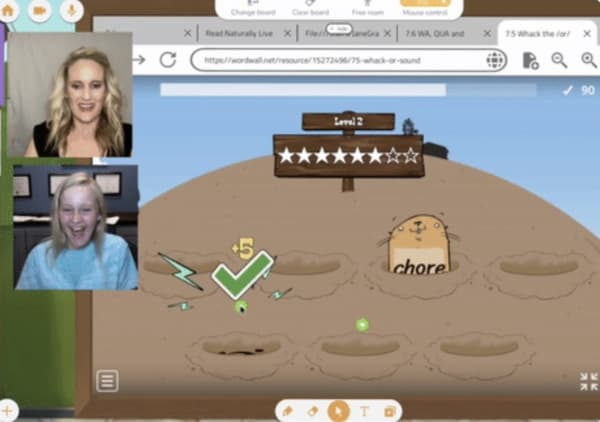
Built for the way kids actually learn online
A gamified 3D playground where your student's avatar can move, build, and explore while they learn. The feature that keeps younger students engaged through a full lesson instead of checking out after 10 minutes.
A proper whiteboard and shared web browsing
Drag in PDFs, worksheets, PowerPoint slides, or images and annotate them with your student in real time. Or pull up any website and interact with it together — the same page, the same clicks. No "can you see my screen?"
24/7 live support that actually replies
The Koala team replies to tutor requests in under two minutes — often in seconds. When a parent can't get connected five minutes before your lesson, you need a human, not a ticket number.
What tutors say once their practice is running
From the 2026 Koala Go user survey. 81% of users said they'd be “very disappointed” without it.
“It has allowed me to set up a thriving online SpLD practice, now with a waiting list.”
“As a Dyscalculia Math Tutor, Koala Go is a fantastic resource — being able to see and interact with my students on the whiteboard, and set up a separate camera for physical math manipulatives.”
“Koala Go is essential to my online teaching business. It provides a more interactive and easy-to-use online teaching system, allowing me to teach my students effortlessly.”
“My students can't wait to come to class.”
“It allows me to reach students in small communities, long distances away, and also during school hours for intervention the school can't provide.”
“Without a doubt the product sells itself.”
“Because the classroom is visually stimulating, my students retain so much more of the lesson than previously.”
“I love how it's built FOR tutors. It's not just a platform that allows web conferencing like some companies.”
“Students stay alert during the entire lesson. This helps them want to learn and come to more classes.”
“KoalaGo makes me look professional and is so easy for families to use!”
“The use of Playground and Cobrowser has helped me set myself apart from other educators. It's a game changer.”
“The platform is much more user friendly and interactive than Zoom.”
“Koala Go works for dyslexic students who need Orton-Gillingham virtually.”
“My students look forward to the playground each day as the highlight of our classes.”
“The most useful for me is the instant, 24/7 assistance, coupled with the self-help videos. A huge bonus for a techno-phobe like me.”
“Students and parents love the platform and the fun, creative lessons I can provide, plus an awesome supportive team.”
“It is the most engaging tutoring platform for kids. No Zoom burnout!”
“Koala's customer service is amazing!!”
“A much better teaching platform than sharing Google slides on Zoom. So user friendly. I can be creative and my students enjoy the clean format.”
“It's easy for my students to use the tools. It's easy for me to access my files and annotate together. I don't need to use two screens to teach.”
Start free. Upgrade when you have paying students.
Open Koala Go and run real lessons today at no cost. Koala Pro is $26/month when you're ready for lesson recordings, priority support, and the full tutor toolkit.
Frequently asked questions
Once the business is set up, the next call is which tool to teach on. Our practical Q&A on choosing an online tutoring platform walks the tradeoffs — Zoom alternatives, whiteboards, cobrowsers, recording, scheduling, pricing — one page per decision.
How much should I charge as an online tutor?
New online tutors in the US and UK typically charge $25–$45/hr. Rates go up with specialization: reading interventionists (Orton-Gillingham, dyslexia support) regularly charge $60–$90/hr; test prep (SAT, ACT) $60–$120/hr; advanced math and music $50–$100/hr. Beginner tutors often underprice themselves out of nerves — don't. Parents often read a low rate as a quality concern. Start at the top of what feels defensible, and raise as demand grows.
Can I run an online tutoring business from home?
Yes — this is how the majority of independent online tutors operate. The practical setup that matters most: a room with a door you can close, a plain-ish background, decent front lighting so parents can see your face clearly, and a wired Ethernet connection if you can get one. Wi-Fi drops mid-lesson are one of the most common avoidable class disruptions we hear about, and a cheap Ethernet cable removes the whole category. Agree the teaching hour with anyone you live with, and if your income crosses the threshold your city or country sets for home businesses, register accordingly.
Do I need a business license or LLC to start tutoring online?
In most US states and in the UK, you can start tutoring as a sole proprietor with no license and still earn income legally (you report the income on your taxes). Check your local requirements — some cities or states require a basic home business license above a certain income threshold. Many tutors start as sole proprietors and incorporate as an LLC once they're consistently earning, because it separates business liability from personal assets.
What equipment do I need to start online tutoring?
Minimum viable setup: a laptop or desktop with a working camera, a USB headset with a mic (better than laptop built-ins for student audio quality), a reliable internet connection (25+ Mbps), and a quiet, well-lit space. Nice-to-haves as you grow: a second monitor, a ring light, a document camera if you teach handwriting or math. The platform you teach on matters more than the hardware.
How do I find my first online tutoring students?
Three channels that consistently work: (1) your personal network — post you're open for students on Facebook, Instagram, and local parent groups; (2) referral partners — reach out to schools, special-ed coordinators, homeschool co-ops, and tutors in adjacent niches; (3) tutoring marketplaces like Wyzant, Preply, or Varsity Tutors to build your first 5–10 student-hours. Marketplaces pay less per hour but help you practice and collect reviews. Once you have 3–5 regular students, word of mouth starts doing the work.
Which platform is best for online tutoring?
Zoom, Google Meet, and Microsoft Teams were built for business meetings, not teaching. They'll work for a trial lesson, but you'll feel the friction quickly — especially with younger students on tablets. Purpose-built tutoring platforms like Koala Go, LearnCube, and Lessonspace include an interactive whiteboard, shared web browsing, and engagement features. Koala Go is free to start, works on every device, includes built-in scheduling and worldwide invoicing, and has 24/7 live support that replies in under two minutes.
How much can I earn tutoring online?
Part-time online tutors earning $30–$50/hr and teaching 10–15 hours per week bring home roughly $1,500–$3,000/month. Full-time specialized tutors at $60–$90/hr with 20–25 booked hours weekly can clear $5,000–$8,000/month. The ceiling is set by your niche, your rate, and how many hours you want to teach — not the number of students, since you can keep the same students for months or years.
How long does it take to get an online tutoring business off the ground?
Most tutors get their first 1–3 students within 2–4 weeks of starting, if they actively promote through personal networks and marketplaces. Getting to a stable schedule of 10+ weekly hours typically takes 2–4 months. The bottleneck isn't skill — it's trust. Once you have a handful of happy parents, referrals compound and you'll often turn students away.
How do I run my online tutoring business day to day?
A daily rhythm that works for independent online tutors is short: a five-minute check of the day's roster and materials in the morning, teaching in 45–60 minute blocks with 15 minutes between, one weekly slot for admin (invoicing, next-week scheduling, lesson prep), and one monthly slot for reviewing rates, referrals, and student progress. The unglamorous work is retention, not acquisition — a student who stays 18 months is worth roughly 3× a student who stays 6, without adding a single new lesson to your calendar. Bundling scheduling, invoicing, and lesson recordings inside one platform is what buys back the evenings.
What software do I need to run a tutoring business?
The short list: (1) a teaching platform with a real interactive whiteboard and shared browsing, built for lessons rather than video calls; (2) a way to schedule lessons and invoice families wherever they live — many purpose-built classrooms include this, and it replaces a stack of consumer tools; (3) a place to store lesson recordings if parents want to review; (4) accounting software for your own books — Wave, FreshBooks, and QuickBooks all have low-cost freelancer tiers. It's easy to overspend on tooling in year one. You can start with your teaching platform alone if it bundles scheduling, invoicing, and recordings (Koala Go does), and add the rest when a specific bottleneck actually shows up.
How much does it cost to start an online tutoring business?
Roughly $60–$120 in cash outlay if you already own a laptop with a working camera. A realistic all-new-hardware budget is $500–$700 (used laptop, USB headset, a simple ring light, an Ethernet cable). Ongoing monthly costs are minimal: your teaching platform (Koala Go's free plan is a real classroom capped at four students per session; Koala Pro is $26/month when you have paying students and bundles scheduling, worldwide invoicing, and lesson recordings) and optional accounting software ($0–$25/month). The bigger cost isn't money — it's the two-to-four-month runway to a steady weekly schedule.
Is online tutoring profitable?
Yes, and the break-even is faster than most other online businesses because your first students come from your personal network — you don't need a customer-acquisition budget to start. A single regular student at $30 an hour more than covers a monthly platform subscription, and a full-time schedule of 20–25 weekly hours at a specialty rate ($60–$120 an hour, for reading interventionists, test prep, and similar) is a legitimate full-time income. The lever that matters most for margin is retention — a student who stays 18 months is worth roughly 3× a student who stays 6 — not headline rates or student count.