
 Backed by Y Combinator
The Zoom Alternative Built for Online Tutoring
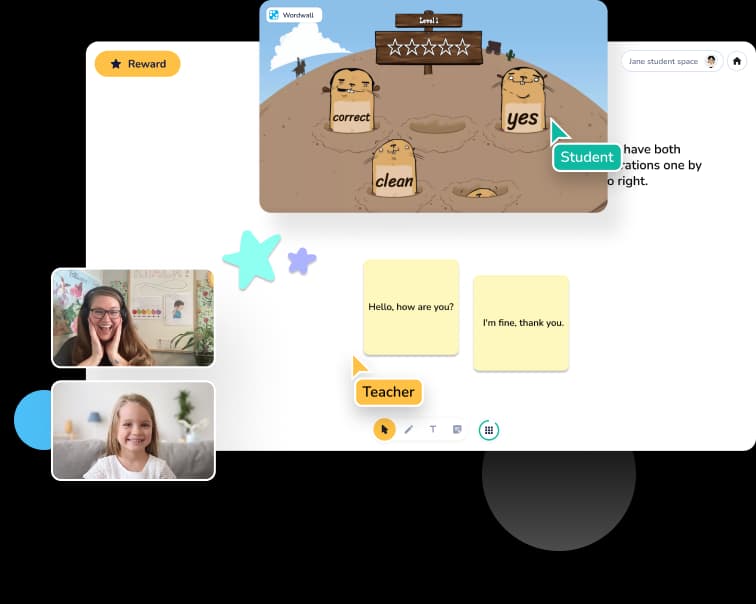
Zoom is a meeting tool. Koala Go is a teaching tool. An interactive whiteboard designed for lessons, a cobrowser that lets you teach on the same webpage together, a gamified 3D playground kids love, and a 24/7 support team that actually replies in seconds. Built for online tutors from day one.
Three reasons tutors leave Zoom
Zoom is excellent software. For meetings. For teaching an 8-year-old on a tablet, it's fighting you every step of the way.
Zoom was built for business meetings
Zoom was designed so VPs can share a slide deck on Tuesday morning. It was never designed so a 7-year-old can learn to read on a Saturday afternoon. Every feature tutors miss — interactive whiteboards, a student-friendly interface, gamified engagement — is missing because Zoom's user isn't you.
Screen share on iPads is painful
Your students aren't on MacBooks. They're on iPads, Android tablets, and Chromebooks. Zoom's screen share on those devices fights pinch-to-zoom, renders text unreadably, and gives kids no way to actually interact with what's on screen. You end up narrating instead of teaching.
When something breaks, you're on your own
Zoom's self-serve support is web forms and forums. Good luck reaching a human mid-lesson when a parent can't connect. Koala Go replies in seconds, 24/7, with a real team that knows tutors.
What you get with Koala Go that Zoom doesn't give you
Not a meeting tool with teaching features bolted on. A teaching platform, purpose-built.
24/7 live support that actually replies
The Koala team is small but relentless. We reply to tutor requests in under two minutes — often in seconds. Kid's mic isn't working five minutes before class? Pop a message in, keep teaching. Try getting that from Zoom.
3D playground — the engagement advantage
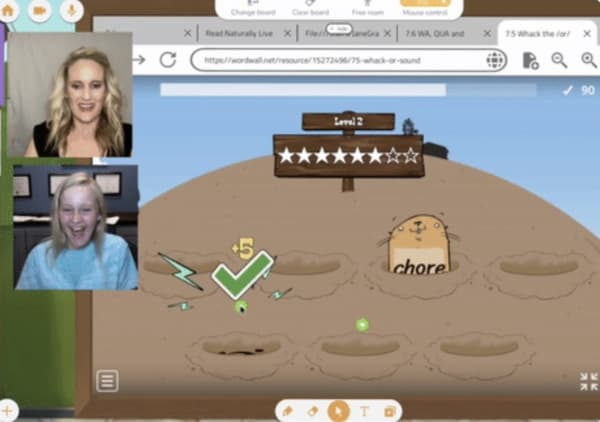
A gamified virtual space where your student's avatar can move, build, and explore while they learn. The feature tutors rave about in their own testimonials. Students stay focused for longer because Koala Go is somewhere they want to be.
Cobrowser — browse the web together
Pull up any website and interact with it alongside your student. A New York Times article, an online math game, a science simulation — you both click, type, and scroll on the same page. No "can you see my screen?" No "wait, it didn't work that way on my end." Just actually teaching.
Interactive whiteboard designed for lessons
Purpose-built for tutoring — not a meeting tool with a whiteboard bolted on as an afterthought. Drag in PDFs, worksheets, PowerPoint slides, or images and annotate them together with your student in real time.
What tutors say after leaving Zoom
Quotes from the 2026 Koala Go user survey. 81% of users said they'd be “very disappointed” without it.
“No Zoom burnout!”
“The platform is much more user friendly and interactive than Zoom.”
“A much better teaching platform than sharing Google slides on Zoom. So user friendly. I can be creative and my students enjoy the clean format.”
“The cobrowser is unique and so much easier to use than a shared screen with remote control on Zoom. It's device-agnostic and easier for students. This makes my teaching more efficient and effective.”
“The support team is fabulous.”
“Koala's customer service is amazing!!”
“Tech support is really fast and helpful. Moving between slides and co-browser makes teachable moments easy to expand lessons.”
“The most useful for me is the instant, 24/7 assistance, coupled with the self-help videos. A huge bonus for a techno-phobe like me.”
“My students can't wait to come to class.”
“It is the most engaging tutoring platform for kids.”
“Without a doubt the product sells itself.”
“Because the classroom is visually stimulating, my students retain so much more of the lesson than previously.”
“I love how it's built FOR tutors. It's not just a platform that allows web conferencing like some companies.”
“The use of Playground and Cobrowser has helped me set myself apart from other educators. It's a game changer.”
“Students stay alert during the entire lesson. This helps them want to learn and come to more classes.”
“KoalaGo makes me look professional and is so easy for families to use!”
“My students look forward to the playground each day as the highlight of our classes.”
“It has allowed me to set up a thriving online SpLD practice, now with a waiting list.”
“Koala Go works for dyslexic students who need Orton-Gillingham virtually.”
“As a Dyscalculia Math Tutor, Koala Go is a fantastic resource — being able to see and interact with my students on the whiteboard, and set up a separate camera for physical math manipulatives.”
Koala Go vs Zoom, feature by feature
Both tools show faces on a screen. Here's everything that happens differently once teaching starts. For a wider comparison that puts Lessonspace, LearnCube, Vedamo, Whereby, and Google Meet alongside Koala Go, see our full guide to the best Zoom alternatives for online tutoring.
| Koala Go | Zoom | |
|---|---|---|
| Built for teaching (not meetings) | ✓ | — |
| Response time for live support | Under 2 minutes, 24/7 | Email / web ticket (hours-days) |
| Interactive whiteboard with PDF/PowerPoint upload | ✓ | — |
| Cobrowser — interact with websites together | ✓ | — |
| 3D gamified playground for student engagement | ✓ | — |
| Works smoothly on iPad and Chromebook | ✓ | Partial |
| Built-in scheduling | ✓ | — |
| Built-in worldwide invoicing | ✓ | — |
| Rewards, stars, confetti for student motivation | ✓ | — |
| Starting price | Free (Pro $26/mo) | Free meetings only, Pro $14.99/mo |
Free to start. $26/month when you're ready.
Open Koala Go and run real lessons today. Upgrade to Koala Pro when you want recordings, priority support, and the full tutor toolkit.
Frequently asked questions
Why do online tutors switch from Zoom?
Three reasons come up over and over: (1) Zoom wasn't built for teaching, so there's no proper whiteboard, no shared web browsing, and no way to keep young students engaged; (2) Zoom's screen share is painful on tablets, which is what most tutoring students actually use; (3) Zoom's support is self-serve — when something breaks mid-lesson, you're on your own. Koala Go was designed from day one to fix all three.
Is Koala Go cheaper than Zoom?
For tutors, yes — on a per-feature basis. Koala Pro is $26/month and includes everything you need to teach: whiteboard, cobrowser, 3D playground, scheduling, worldwide invoicing, and 24/7 live support. Zoom Pro is $14.99/month but doesn't include any of those teaching-specific tools — you'd still need separate tools for whiteboarding, scheduling, and invoicing. Koala Go also has a free tier to get started.
How fast is Koala Go's live support?
The Koala support team typically replies in under two minutes — often within seconds. Support runs 24/7 via the in-app chat. For tutors running back-to-back lessons with students around the world, that matters: if a parent can't get connected five minutes before class, you need a human now, not a ticket number.
Do I need to install anything?
No. Koala Go runs entirely in the browser. Tutors and students just click a link to join a lesson — no downloads, no student accounts required, no IT approvals.
Does it work on iPad, Android tablets, and Chromebooks?
Yes — and this is one of the biggest reasons tutors switch from Zoom. Koala Go is designed to work smoothly on iPad, Android tablets, and Chromebooks, which is what most students actually use. Screen share on Zoom for iPad users is famously clunky. Koala Go's interactive whiteboard and cobrowser sidestep that problem entirely.
Can I record my lessons?
Yes, lesson recordings are available for Koala Pro subscribers. Recordings are automatically saved so you can share them with parents or review them yourself.
Can I keep my existing Zoom lesson materials?
Yes. You can upload PDFs, PowerPoint slides, worksheets, and images directly into Koala Go's whiteboard and annotate them with your students. Most tutors migrate their Zoom lesson plans over in an afternoon.