
 Backed by Y Combinator
The Virtual Classroom Built for Online Tutors
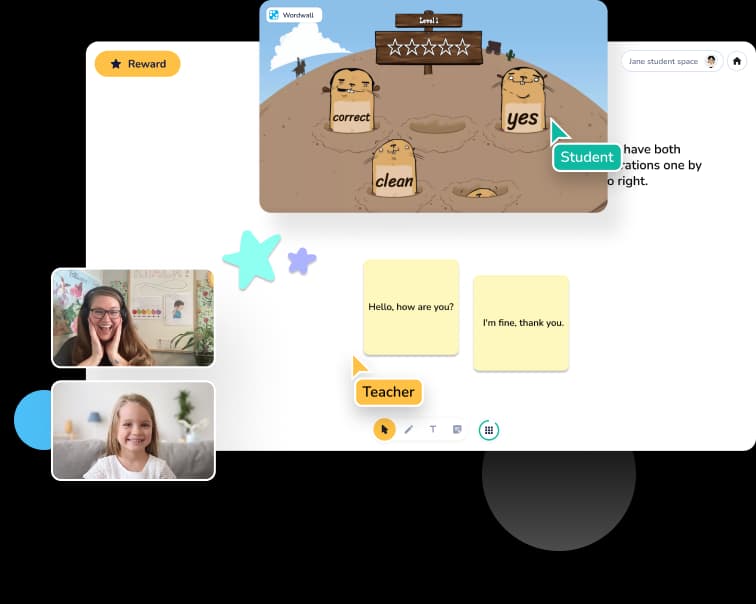
Zoom and Google Meet were designed for meetings. Koala Go was designed for teaching — a gamified 3D playground, an interactive cobrowser, and a whiteboard built for lessons. Plus scheduling and invoicing in the same place. Kids stay engaged. Tutors stop fighting their tools.
Why online tutors are leaving generic video tools
Zoom and Google Meet are fine for a 9am stand-up. They are genuinely frustrating for teaching a 7-year-old to read on an iPad. Looking at Google Classroom as the teaching side of the stack? Our Q&A on Google Classroom for private tutoring explains why an LMS built for whole schools isn't the right shape for 1-on-1 lessons.
Zoom burnout is real
Tutors tell us this in their own words. Video-meeting tools make lessons feel like business calls — kids disengage within minutes, especially the younger ones, and you spend the session trying to win their attention back.
Screen share is painful on tablets
Most tutoring students learn on iPads, Android tablets, or Chromebooks. Zoom screen share is clunky on tablets — pinch-to-zoom fights the stream, text is unreadable, and students can't actually interact with what's on screen.
Your stack is scattered
Video here, whiteboard there, scheduling in a third tool, invoicing in a fourth. Every switch is friction — for you and for your students' parents.
Built for how online tutors actually teach
Every feature in Koala Go exists because tutors asked for it. Nothing exists because enterprise IT departments asked for it. Picking a whiteboard is its own decision — see our comparison of the best online whiteboards for tutoring for an honest read on where Koala Go's whiteboard wins and where standalone tools pull ahead.
3D playground — the engagement advantage
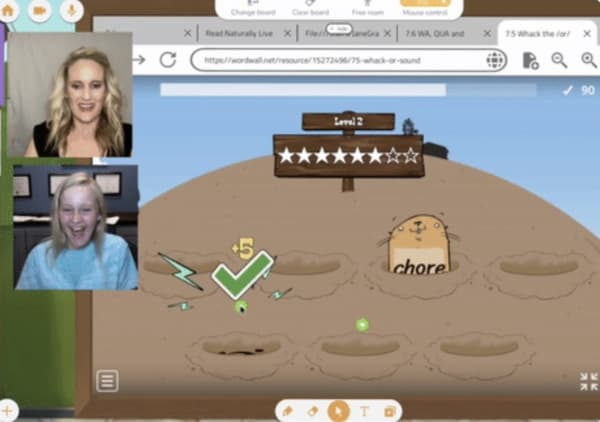
A gamified virtual space where your student's avatar can move, build, and explore while they learn. The feature tutors mention first in their own testimonials. Students stay focused for longer lessons because Koala Go is somewhere they want to be — not somewhere they have to be.
Cobrowser — browse the web together
Pull up any website and interact with it alongside your student. A New York Times article, an online math game, an interactive science simulation — you both click, type, and scroll on the same page. No more "can you see my screen?"
Interactive whiteboard designed for lessons
Purpose-built for tutoring — not a meeting tool with a whiteboard bolted on. Drag in PDFs, worksheets, PowerPoint slides, or images and annotate them together with your student in real time.
Scheduling, invoicing, rewards — all in one tool
Koala Go includes built-in scheduling, worldwide invoicing (take payments from parents in any country), and a rewards system with stars and confetti that motivates kids through every lesson. One tool instead of five.
What online tutors say about Koala Go
From the 2026 Koala Go user survey. 81% of users said they would be “very disappointed” without it.
“My students can't wait to come to class.”
“It is the most engaging tutoring platform for kids. No Zoom burnout!”
“Without a doubt the product sells itself.”
“The platform is much more user friendly and interactive than Zoom.”
“It has allowed me to set up a thriving online SpLD practice, now with a waiting list.”
“Because the classroom is visually stimulating, my students retain so much more of the lesson than previously.”
“I love how it's built FOR tutors. It's not just a platform that allows web conferencing like some companies.”
“The use of Playground and Cobrowser has helped me set myself apart from other educators. It's a game changer.”
“Students stay alert during the entire lesson. This helps them want to learn and come to more classes.”
“The cobrowser is unique and so much easier to use than a shared screen with remote control on Zoom. It's device-agnostic and easier for students. This makes my teaching more efficient and effective.”
“My younger students — who previously struggled with whiteboard-focused platforms — are so much more actively engaged with Koala Go and make better progress.”
“My students look forward to the playground each day as the highlight of our classes.”
“KoalaGo makes me look professional and is so easy for families to use!”
“Lessons aren't boring.”
“It's easy for my students to use the tools. It's easy for me to access my files and annotate together. I don't need to use two screens to teach.”
“A much better teaching platform than sharing Google slides on Zoom. So user friendly. I can be creative and my students enjoy the clean format.”
“Koala Go works for dyslexic students who need Orton-Gillingham virtually.”
“Students and parents love the platform and the fun, creative lessons I can provide, plus an awesome supportive team.”
“It allows me to reach students in small communities, long distances away, and also during school hours for intervention the school can't provide.”
“As a Dyscalculia Math Tutor, Koala Go is a fantastic resource — being able to see and interact with my students on the whiteboard, and set up a separate camera for physical math manipulatives.”
Koala Go vs Zoom vs Google Meet
Every general video tool can show a face and a screen. Here's what changes when your software is built for tutoring. Weighing the wider field of purpose-built options? Our guide to choosing an interactive online teaching platform walks through the tradeoffs between live virtual classrooms and slide-based lesson tools. For a head-to-head against Lessonspace, LearnCube, Vedamo, Whereby, and Google Meet, see our full guide to the best Zoom alternatives for online tutoring.
| Koala Go | Zoom | Google Meet | |
|---|---|---|---|
| Built for teaching (not meetings) | ✓ | — | — |
| Interactive whiteboard with PDF/PowerPoint upload | ✓ | — | — |
| Cobrowser — interact with websites together | ✓ | — | — |
| 3D gamified playground | ✓ | — | — |
| Works smoothly on iPad and Chromebook | ✓ | Partial | Partial |
| Built-in scheduling | ✓ | — | — |
| Built-in worldwide invoicing | ✓ | — | — |
| Rewards, stars, confetti for student motivation | ✓ | — | — |
| 24/7 live support for tutors | ✓ | Paid tier | — |
Free to start. $26/month when you're ready.
Open Koala Go and run real lessons today. Upgrade to Koala Pro when you want recordings, priority support, and the full tutor toolkit.
Frequently asked questions
Have a more specific question about picking the right tool? Our practical Q&A library on choosing an online tutoring platform covers cobrowsers, whiteboards, scheduling, recording, and pricing — one page per question, written for independent tutors.
What is a virtual classroom?
A virtual classroom is an online learning environment where a tutor and their student(s) meet in real time — with video, audio, and the teaching tools needed to run an actual lesson (whiteboard, shared documents, interactive activities). Unlike general-purpose video conferencing, a virtual classroom is designed specifically for teaching: the interface, features, and engagement tools all prioritize learning outcomes.
How is Koala Go different from Zoom?
Zoom is designed for business meetings. Koala Go is designed for online tutoring. That means purpose-built tools (interactive whiteboard, cobrowser, 3D playground), a student-friendly interface that works smoothly on tablets, built-in scheduling and invoicing, and a rewards system that keeps kids engaged throughout the lesson.
Do I need to install anything?
No. Koala Go runs in the browser. Tutors and students just click a link to join a lesson — no downloads, no accounts required for students.
Does it work on iPad, Android tablets, and Chromebooks?
Yes. Koala Go is built to work smoothly on all major devices: iPad, Android tablets, Chromebooks, Mac, Windows, and Linux. This matters for online tutors because most students learn from a tablet.
Can I record my lessons?
Yes, lesson recordings are available for Koala Pro subscribers. Recordings are automatically saved so you can share them with parents or review them yourself.
Is there a free trial?
Yes. You can open Koala Go and run full lessons for free. Koala Pro unlocks additional features like lesson recordings, priority support, and advanced tools.
How much does Koala Go cost?
Koala Go is free to start. Koala Pro is $26/month and unlocks the full toolkit for serious tutors. See our pricing page for the latest details.