
 Backed by Y Combinator
The Online Classroom Built for ESL Tutors
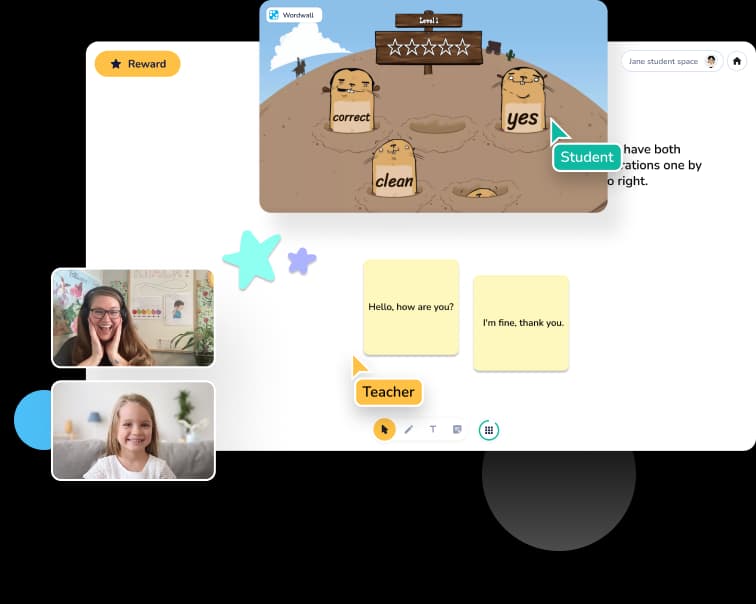
Your ESL curriculum — Abridge Academy, Flip the Classroom, Crystal Clear ESL, Wordwall — lives on the web. Your young students learn by clicking, dragging, and playing, not watching. Koala Go's cobrowser lets you open any lesson and teach inside it alongside your student. No more Zoom screen share. No more passive kids. Free to start.
Why ESL tutors switch from Zoom
ESL teaching is interactive by design. Zoom is not. The gap shows up in every lesson. If you're already weighing a switch, our side-by-side of the best Zoom alternatives for online tutoring runs through Koala Go alongside Lessonspace, LearnCube, Vedamo, Whereby, and Google Meet. New to running an independent ESL practice? Our practical Q&A on how to teach English online covers finding students, setting rates, and keeping young learners engaged.
Your curriculum lives on the web. Zoom doesn't
ESL curricula — Abridge Academy, Flip the Classroom, Crystal Clear ESL, Wordwall — are interactive websites built to be clicked and played. Zoom treats them as something to screen-share. Your student watches; they don't learn through playing. The whole interactive premise of your curriculum gets lost.
TPR and pointing don't work on a passive screen
Total Physical Response lives or dies by whether students can point, click, drag, and respond physically. On a Zoom screen share, your student is a passive viewer. On Koala Go's cobrowser, you both click the same button — the lesson actually becomes interactive.
Young ESL students learn on iPads. Video tools don't
Most of your youngest students are on iPads, Android tablets, and Chromebooks. Zoom screen share on those devices is painful — pinch-to-zoom fights the stream, text is unreadable, and there's no way for kids to tap anything on your screen. You end up narrating instead of teaching.
Built for how ESL tutors actually teach
Every feature exists because tutors asked for it. ESL tutors especially — they spend more time in the cobrowser than any other group. Considering a familiar tool like Google Classroom for the teaching itself instead? Our Q&A on Google Classroom for private tutoring walks through what an LMS does well and where it falls down for live ESL lessons.
Cobrowser — teach inside your ESL curriculum, together
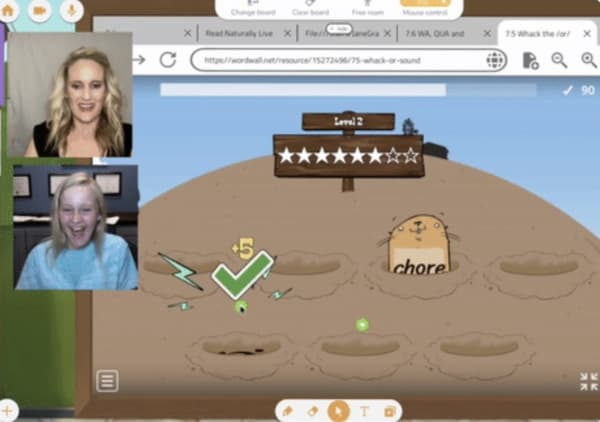
Open any web-based lesson — Abridge Academy, Flip the Classroom, Crystal Clear ESL, Wordwall, Boom Learning, YouTube, a reading game — and teach alongside your student. You both click, drag, type, and scroll on the same page. ESL tutors consistently call this Koala Go's #1 feature.
Interactive whiteboard designed for language lessons
Drag in PDFs, flashcards, worksheets, or images and annotate them with your student in real time. Great for phonics, sentence-building, handwriting practice, and vocabulary drills — anywhere your student needs to actually produce the language, not just watch.
3D playground — rewards that keep young learners in the lesson
Young ESL students have short attention spans in their first language. In a second language, even shorter. The 3D playground is a gamified space where kids earn rewards, explore, and stay focused for full lessons — because Koala Go is somewhere they want to be.
24/7 live support that actually replies
ESL classes run across time zones. Your 6am lesson isn't Zoom support's 6am. The Koala team replies to tutor messages in under two minutes — often in seconds — around the clock. When a parent can't connect five minutes before class, you need a human, not a ticket.
What ESL tutors say about Koala Go
From the 2026 Koala Go user survey. 81% of users said they'd be “very disappointed” without it.
“Great co browser.”
“The biggest thing that sets Koala Go apart from most other platforms is the shared web browser. This is a huge selling feature for me.”
“Students stay alert during the entire lesson. This helps them want to learn and come to more classes.”
“It is the most engaging tutoring platform for kids. No Zoom burnout!”
“The use of the cobrowser by using interactive curriculum with students.”
“My students can't wait to come to class.”
“Use of co-browser as well as whiteboard and playground of course.”
“An interactive platform that is both educational and entertaining for students, as well as the teachers themselves!”
“Koala Go is essential to my online teaching business. It provides a more interactive and easy-to-use online teaching system, allowing me to teach my students effortlessly. In particular, my younger students — who previously struggled with more whiteboard-focused platforms — are so much more actively engaged in class with Koala Go and make better progress.”
“I love how it's built FOR tutors. It's not just a platform that allows web conferencing like some companies.”
“The platform is much more user friendly and interactive than Zoom.”
“A much better teaching platform than sharing Google slides on Zoom. So user friendly. I can be creative and my students enjoy the clean format.”
“The use of Playground and Cobrowser has helped me set myself apart from other educators. It's a game changer.”
“Without a doubt the product sells itself.”
“Because the classroom is visually stimulating, my students retain so much more of the lesson than previously.”
“Koala's customer service is amazing!!”
“The most useful for me is the instant, 24/7 assistance, coupled with the self-help videos. A huge bonus for a techno-phobe like me.”
“My students look forward to the playground each day as the highlight of our classes.”
“KoalaGo makes me look professional and is so easy for families to use!”
“Lessons aren't boring.”
Koala Go vs Zoom for ESL teaching
Both show faces on screen. Here's everything that happens differently once an actual ESL lesson starts. Comparing whiteboards specifically — for phonics, flashcards, and handwriting? See our guide to the best online whiteboards for tutoring.
| Koala Go | Zoom | |
|---|---|---|
| Interactive cobrowse of ESL curricula (Abridge, Flip the Classroom, Crystal Clear, Wordwall) | ✓ | — |
| Students can click and interact with websites together | ✓ | — |
| Proper whiteboard for phonics, flashcards, handwriting | ✓ | — |
| Works smoothly on iPads and Android tablets | ✓ | Partial |
| Reliable for students in mainland China | ✓ | Partial |
| Gamified rewards for young learners | ✓ | — |
| 24/7 live support for cross-timezone teaching | Under 2 minutes | Email / ticket |
| Built-in scheduling and worldwide invoicing | ✓ | — |
| Starting price | Free (Pro $26/mo) | Free meetings only, Pro $14.99/mo |
Free to start. $26/month when you're ready.
Open Koala Go and run real ESL lessons today. Upgrade to Koala Pro when you want lesson recordings, priority support, and the full tutor toolkit.
Frequently asked questions
Weighing the wider category of tutoring tools? Our practical Q&A on choosing an online tutoring platform covers Zoom alternatives, whiteboards, cobrowsers, recording, and the other platform-choice questions ESL tutors ask.
Does Koala Go work with Abridge Academy, Flip the Classroom, Crystal Clear ESL, and other curricula?
Yes. Koala Go's cobrowser opens any web-based curriculum and lets you and your student interact with it together — both of you clicking, typing, and scrolling on the same page. ESL tutors use it daily with Abridge Academy, Flip the Classroom, Crystal Clear ESL, Wordwall, Boom Learning, YouTube, and hundreds of other interactive sites. No special integration needed: if it loads in a browser, it works in the cobrowser.
Can my students actually click and interact with websites, or just watch?
Actually click and interact. This is the key difference vs Zoom screen share. On Zoom, your student watches you move your mouse. On Koala Go's cobrowser, you both share control of the same web page — your student can type answers into Wordwall, drag letters on a phonics game, click through a Boom Learning deck. The lesson stays interactive, which is essential for young language learners.
Does Koala Go work on iPads and Android tablets?
Yes — and this is why many ESL tutors switch from Zoom. Most young ESL students learn on an iPad, Android tablet, or Chromebook. Koala Go is built to work smoothly on all of them, including the cobrowser. No pinch-to-zoom fighting the screen share, no unreadable text, no students locked out of interaction.
Is there a free way to try Koala Go as an ESL tutor?
Yes. Koala Go is free to start — you can run real lessons with your students at no cost. Koala Pro is $26/month when you're ready for lesson recordings, priority support, and the full toolkit. No credit card required to try.
Do my ESL students need to install anything?
No. Koala Go runs entirely in the browser. Students just click a link to join — no app to download, no accounts to create, no parents fighting with IT. This matters for ESL classes where parents and students may not share your first language.
Can I record lessons to send to parents?
Yes, lesson recordings are available on Koala Pro. Many ESL tutors share recordings with parents who want to review what was covered, or with students who want to rewatch a tricky segment. Recordings save automatically.
How does Koala Go compare to ClassIn, PencilSpaces, or Lessonspace for ESL?
All four are purpose-built teaching platforms, and any of them beats Zoom for ESL. Koala Go's distinctive features are the cobrowser (which ESL tutors rave about — it's the thing competitors have the least mature version of), the 3D playground for young learner engagement, built-in worldwide invoicing, and 24/7 live support that responds in under two minutes. Koala Go is also free to start, where most competitors gate behind a subscription from day one.
Can I teach students in mainland China with Koala Go?
Yes. Many ESL tutors use Koala Go daily with students in mainland China — including lessons that rely on the cobrowser, whiteboard, and playground. There's nothing special you need to configure as the tutor; students just click your lesson link like anywhere else in the world.