Important Instructions for Parents Paying through WeChat

-
When you send an invoice to a parent for the very first time, the parent will receive a payment instruction in Chinese from Koala, walking them through the details. The following instructions are in English. Please use it for reference.
-
After the invoice is sent through Koala, the client will receive an email titled “New Invoice from Koala” in their inbox. It will come from “Koala”, not the tutor’s email address. If they don’t see it, ask them to check the spam folder.

-
After the client opens the email, click the yellow button that says “pay this invoice”

-
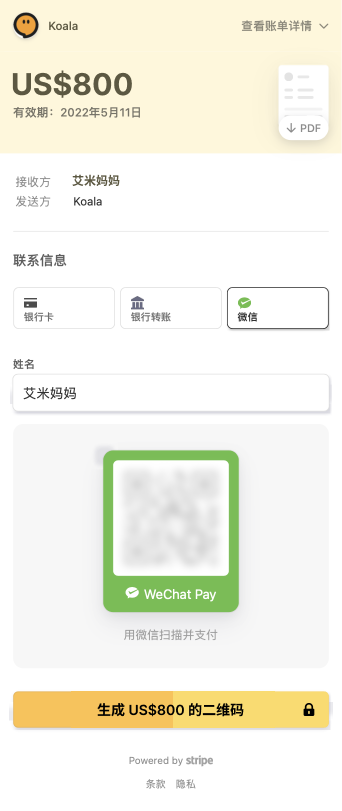
When the QR code is displayed, the client SHOULD NOT do the following:
- Take a screenshot
- Download the QR code
- Save it as a photo
- Long hold on the QR code to detect code
Instead, they SHOULD use a second phone to scan the code and complete the payment on the second phone. If they don’t have two phones, they can open the email and generate the QR code from the email on a computer or a tablet (such as an iPad), then use their phone to scan the QR code displayed on the computer or table. This is the only way WeChat will allow the payment. Do not attempt other creative ways to do it. It will simply not work.
-
Sometimes, if it’s the very first time someone tries to pay a Koala invoice, it will fail due to WeChat’s default security setting. If the client simply tries again, it will typically go through.
-
QR code can expire, so it’s important to NOT take screenshots. Go to the invoice email to generate a fresh QR code each time the client attempts to pay.
-
Youtube video for tutors on the end-to-end invoicing experience:https://youtu.be/sB-R0vucdzs
-
If the client is still having issues, Koala has a Mandarin-English bilingual resource who can help you and your client on WeChat.